Lab: Capture the Flag
Due: Wednesday, December 16 at 11:59pm (one week after it is assigned) · Worth: 5 extra-credit points
Test a login that rejects a wrong password but lets input change its SQL query. Capture two flags, repair the query, and repeat the attempts to check the fix. This optional extra-credit lab connects password cracking to your Twitter clone’s SQL injection checks.
Start
Create and clone an empty lab-ctf repository; there is no starter. A capture-the-flag challenge hides secret strings that demonstrate a successful exploit. This app has two, both shaped like CTF{...}.
A Login That Rejects a Wrong Password
The target is a login route that builds its SQL query by joining the user’s input directly into a string.
"SELECT * FROM users WHERE username='" + name + "' AND password='" + pw + "'"The user controls what lands inside those quotes and can send SQL syntax instead of a username or password.
Save the target below as ctf_target.py. It keeps a throwaway database in memory with users bob and admin, each guarding a flag. Their example passwords appear in the source; pretend you do not know them during the attacks.
# ctf_target.py -- a DELIBERATELY vulnerable login. Run it ONLY on your own machine.
import sqlite3
import uvicorn
from fastapi import FastAPI, Form
from fastapi.responses import HTMLResponse

# A throwaway in-memory database with two users, each hiding a secret flag.
# check_same_thread=False lets FastAPI's worker threads share this one connection;
# we only ever read from it, so that is safe here.
db = sqlite3.connect(':memory:', check_same_thread=False)
db.execute('CREATE TABLE users (username TEXT, password TEXT, flag TEXT)')
db.executemany('INSERT INTO users VALUES (?, ?, ?)', [
    ('bob',   'S6p!nwQ2zx8L', 'CTF{single_quotes_are_a_skeleton_key}'),
    ('admin', 'k9$Rf7vT1mAe', 'CTF{a_dash_dash_walked_past_the_password}'),
])
db.commit()

app = FastAPI()

FORM = '''
<h2>CS40 CTF login</h2>
<form method="post">
  <input name="username" placeholder="username">
  <input name="password" placeholder="password" type="password">
  <button>Log in</button>
</form>
'''

@app.get('/', response_class=HTMLResponse)
async def form():
    return FORM

@app.post('/', response_class=HTMLResponse)
async def login(username: str = Form(''), password: str = Form('')):
    # NEVER build a query like this. Gluing user input into SQL is the whole bug.
    sql = "SELECT username, flag FROM users WHERE username='" + username + "' AND password='" + password + "'"
    row = db.execute(sql).fetchone()
    if row:
        return FORM + f'<p>Logged in as <b>{row[0]}</b>. Flag: <code>{row[1]}</code></p>'
    return FORM + '<p>Wrong username or password.</p>'

if __name__ == '__main__':
    uvicorn.run(app, host='127.0.0.1', port=8000)
The backend reading explains the two routes at /: GET displays the form; POST checks the login and returns a flag on success. In lab-ctf, set up its Python environment. Create requirements.txt with the three libraries:
fastapi
uvicorn
python-multipart
Install them in the activated environment and run the target:
python -m pip install -r requirements.txt
python ctf_target.py
Open http://127.0.0.1:8000 and try bob with password password; the login should fail. If your Twitter clone occupies port 8000, change the port in the last line.
Warning. Run this only against your own copy on your own machine. Attacking a computer you do not own or have written permission to test is a crime in the US under the Computer Fraud and Abuse Act. Only test systems when the owner has given you permission.

Two Ways Past the Password Check
Keep bob in the username field. Go to the login form and, in the password box, type exactly this, then submit:
' OR '1'='1You are logged in, and a flag appears. Read what your input did to the query the server built:
SELECT username, flag FROM users WHERE username='bob' AND password='' OR '1'='1'Your leading ' closed the password string early, and OR '1'='1' added a condition to the WHERE clause that is true for every row in the table. AND binds tighter than OR, so the database reads it as “(right username and empty password) or this-is-always-true” and returns every user. The server calls .fetchone(), grabs the first row, and logs you in as whoever that is: bob.
To choose the account, inject SQL through the username box. The target has no sessions or logout button. Use the form again, this time typing into the username field:
admin'--Put anything at all in the password box. The login succeeds as admin and produces this query:
SELECT username, flag FROM users WHERE username='admin'--' AND password='...'The -- begins a SQL comment, so the database ignores the rest of the line, including the password check. What runs is SELECT username, flag FROM users WHERE username='admin'. Swap in bob'-- to log in as bob; the comment bypass lets you choose the username.
Capture both flags. Also type a lone ' into either box and submit: the query becomes malformed, and you get a SQL error in the terminal (an Internal Server Error in the browser). The error shows that your input is reaching the query as code.
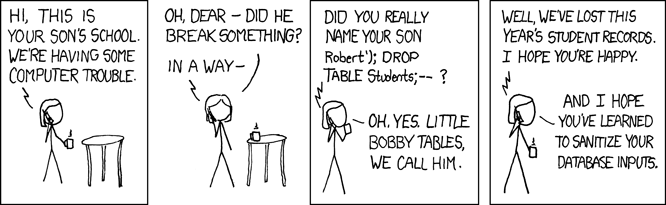
The Same Attempts After a Repair
Separate the SQL structure from user-supplied values: put ? placeholders in the query and pass the values to execute in a tuple. Change only the two lines inside the login route:
@app.post('/', response_class=HTMLResponse)
async def login(username: str = Form(''), password: str = Form('')):
    sql = "SELECT username, flag FROM users WHERE username=? AND password=?"
    row = db.execute(sql, (username, password)).fetchone()
    if row:
        return FORM + f'<p>Logged in as <b>{row[0]}</b>. Flag: <code>{row[1]}</code></p>'
    return FORM + '<p>Wrong username or password.</p>'
Restart and repeat both attacks; each should fail. The parameters are now literal values, so admin'-- is a username that does not exist. Also test a real password from ctf_target.py and the wrong password password: the first should succeed and the second fail. Record the outcomes; rejecting every login would lock out legitimate users too.
Parameterized queries are the standard fix for this injection bug. Use the ? placeholder from the SQL injection section of the backend reading in the final project: a Twitter clone whose automatic security checks exercise injection attempts. Every execute call in your project must use placeholders for user-supplied values.

Go Further (Optional)
Level 3 of Stripe’s 2012 CTF uses the same SQL injection in a Flask app. Compare its login code with this target; running the archived Python 2 app is not required. ctftime.org lists current competitions.
Bug bounty programs invite people to report vulnerabilities privately for rewards, including Stripe’s program on HackerOne. Security testing requires the system owner’s permission.

Submit
Create answers.md containing:
Screenshots are optional. All 5 extra-credit points are automatic: injection strings and flags (2), and the parameterized query accepting independent valid credentials while rejecting wrong passwords and injections (3). Explanations are practice; their wording is ungraded. Mention any further Stripe CTF work.
Commit and sync answers.md, then submit lab-ctf and its branch through Gradescope’s GitHub option; see the first lab for the steps.
Grading Rubric
Gradescope checks each item separately and adds the points earned.
Total: 5 points.