Syntactic Sugar
A server-scan report lists the addresses that responded to a request. We will start with a loop that builds this list and see how a comprehension expresses the same calculation. The lab adapts war dialing, which searched telephone numbers for computers, to the DPRK’s 1024-address block using simulated responses. All examples here use a local lookup, so running them sends no network requests. They need no third-party packages.
Server Report
A real downloader uses requests and try/except from the web-scraping and exceptions weeks. A simulation lets us work on the loop with predictable answers. Create scan_report.py in a new folder. Start with four sample addresses and a function that looks up whether each has a server:
dprk_ips = ['175.45.176.0', '175.45.176.1', '175.45.176.2', '175.45.176.3']
server_responses = {
    '175.45.176.0': False,
    '175.45.176.1': True,
    '175.45.176.2': False,
    '175.45.176.3': True,
}

def is_server_at_hostname(ip):
    return server_responses[ip]
The function looks up each address in the dictionary. Append this accumulator loop to scan_report.py. It walks the list of IPs and keeps the ones that answer:
dprk_ips_with_servers = []
for ip in dprk_ips:
    if is_server_at_hostname(ip):
        dprk_ips_with_servers.append(ip)
Append this print call, save the file, and run python3 scan_report.py from its folder:
print(dprk_ips_with_servers)The added lines print:
['175.45.176.1', '175.45.176.3']Those two addresses, in that order, are the behavior our shorter version must preserve. Python can express an accumulator loop in one line with a list comprehension. This is an example of syntactic sugar: shorter syntax for something we could already write.
Translating the short form into the long one is called desugaring. When a comprehension is unclear, write out the loop it represents.
For and While Loops
We can write the same counting loop with for or while. Create a separate sugar_examples.py in the same folder for these small experiments. Start with this counting loop and run python3 sugar_examples.py:
for i in range(5):
    print(i)
Replace that loop with this while loop, save the file, and run it again. This version manages the counter by hand:
i = 0
while i < 5:
    print(i)
    i = i + 1
Both print 0 through 4. The for version avoids counter bookkeeping: initializing the counter at 0, incrementing it by 1, and choosing between < and <=.

The choice depends on what controls repetition: while checks a condition, for requests successive items from an iterable, and a list comprehension collects computed values into a list. An iterable supplies items one at a time. Lists, strings, file objects, and range all support this operation. The counter-based translation above applies to this particular range, while a loop over a file obtains lines from the file instead. Choose the form that states the job directly: a comprehension for building a list, for for processing items, and while when you must keep checking a condition.
Back in the factorial function we wrote result = result * i. Python lets you shorten that to result *= i. Operators such as += and -= also combine arithmetic with assignment. For numbers, these operators save repeating the variable name. With mutable objects the distinction can matter: list += changes the existing list, while list + creates a new list.
Unpacking and Pairing Values
A scan result has two fields: an address and whether it responded. Append this to scan_report.py and run it:
result = ('175.45.176.1', True)
ip, responded = result
print(ip)
print(responded)
It prints the address and then True. Unpacking assigns successive items to successive names. It works with lists, tuples, and strings, so first, second = 'ok' assigns 'o' and 'k'. The number of items must match the number of names, or Python raises ValueError. An integer supplies no items to unpack, so unpacking one raises TypeError. Python evaluates the right side before assigning anything. That makes first, second = second, first a swap.
Suppose another scanner gives us separate lists of addresses and responses. zip pairs corresponding entries, like the two sides of a zipper. Append this example:
responses = [False, True, False, True]
for ip, responded in zip(dprk_ips, responses):
    print(ip, responded)
Each iteration unpacks one pair. The first line is 175.45.176.0 False. zip stops when its shortest input ends, so extra items in a longer input are omitted. list(zip(dprk_ips, responses)) collects the pairs into a list of tuples.
To number the report’s rows, append:
for index, ip in enumerate(dprk_ips):
    print(index, ip)
enumerate supplies an index and an item together. Its default first index is zero, so the first line is 0 175.45.176.0. list(enumerate(dprk_ips)) collects these pairs too.
List Comprehensions
Before filtering addresses, try building a list from every input item. An accumulator loop can transform each item and collect the results. Replace the contents of sugar_examples.py with this loop, which greets everyone in a list of names:
names = ['alice', 'bob', 'charlie', 'dave', 'eve']
greetings = []
for name in names:
    greetings.append('hello ' + name)
The loop walks over names and appends one greeting per name. append changes the existing greetings list in place and returns None, so we call it without assigning its return value. For a different transformation, only 'hello ' + name needs to change.
Keep the names assignment. Replace the accumulator and loop with this list comprehension, which writes the pattern in a single line:
greetings = ['hello ' + name for name in names]Append a print call and run python3 sugar_examples.py:
print(greetings)The added lines print:
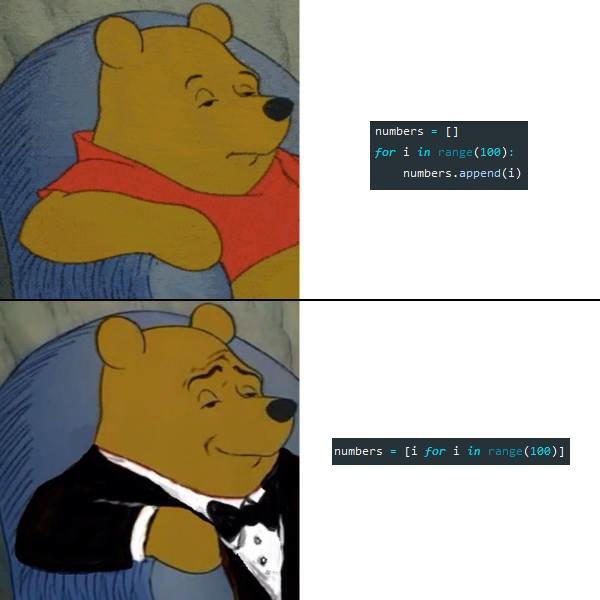
['hello alice', 'hello bob', 'hello charlie', 'hello dave', 'hello eve']Read it from the inside out: for each name in names, compute 'hello ' + name and collect the results into a list. The general shape is [COMPUTATION for VARIABLE in LIST], and it desugars into this outline of the original loop (the capitalized words are placeholders, not code to add to the file):
accumulator = []
for VARIABLE in LIST:
    accumulator.append(COMPUTATION)
To read an unfamiliar comprehension, expand it into these three lines.
Append this calculation to sugar_examples.py and rerun it to see the squares of the first ten numbers:
print([x*x for x in range(10)])The added lines print:
[0, 1, 4, 9, 16, 25, 36, 49, 64, 81]For each x from 0 to 9, compute x*x. range(10) supplies the sequence to walk. A useful rule for reading other people’s code: any time you see the keyword for inside square brackets, you are looking at a comprehension.
Filtering
The scan should keep an address only when its response is true. A comprehension filters items with an if at the end, just as our scraper filtered rows. Append this example to sugar_examples.py, then save and rerun it. It keeps only the short words in a sentence:
sentence = 'This is an example sentence with a few words in it.'
print([word.lower() for word in sentence.split() if len(word) <= 2])
The added lines print:
['is', 'an', 'a', 'in']split() breaks the sentence into words, the if len(word) <= 2 keeps only the short ones, and word.lower() transforms each survivor. Although the transformation is written first, Python checks the filter before evaluating it. 'This' is rejected at length four. 'is' passes and contributes 'is'. 'it.' is rejected because its period is still part of the word. The shape is now [COMPUTATION for VARIABLE in LIST if CONDITION], and it desugars into this outline with an if nested inside (again, leave these placeholders out of your file):
accumulator = []
for VARIABLE in LIST:
    if CONDITION:
        accumulator.append(COMPUTATION)
The condition can be any expression Python reads as true or false. Python treats 0, empty strings, and empty collections as false. Nonzero numbers and nonempty strings and collections are true. That is why x % 2 works as an is-odd test: the remainder is 1 (true) for odd numbers and 0 (false) for even ones. Append this line to sugar_examples.py and rerun it to keep the squares of the odd numbers:
print([x*x for x in range(10) if x % 2])The added lines print:
[1, 9, 25, 49, 81]Comprehensions can filter a list of records in one line: [t for t in tweets if 'trump' in t['text'].lower()] selects every tweet that mentions Trump.
Return to scan_report.py. Keep the original loop for comparison and append the following code, then run python3 scan_report.py:
loop_result = dprk_ips_with_servers
dprk_ips_with_servers = [ip for ip in dprk_ips if is_server_at_hostname(ip)]
print(dprk_ips_with_servers)
print(dprk_ips_with_servers == loop_result)
The added lines print:
['175.45.176.1', '175.45.176.3']
True
The expression ip keeps the original address, and the condition determines whether to include it. Both versions perform the same lookup once per address, in the same order.
Dictionary Comprehensions
We may also want a lookup table with a result for every address. Try the key-and-value shape with the names from our greetings example. A dictionary comprehension builds a dict with {key: value for ...}. Append this check to sugar_examples.py and rerun that file:
print({name: len(name) for name in names})The added lines print:
{'alice': 5, 'bob': 3, 'charlie': 7, 'dave': 4, 'eve': 3}For each name we make one entry mapping the name to its length. Dictionary comprehensions replace the square brackets with curly braces and the computation with a key: value pair.
In scan_report.py, append this lookup table and two checks, then rerun the report:
status_by_ip = {ip: is_server_at_hostname(ip) for ip in dprk_ips}
print(status_by_ip['175.45.176.1'])
print(status_by_ip['175.45.176.2'])
The added lines print:
True
False
F-strings are sugar for joining strings, and a with block that closes a file is sugar for a try/finally block. The Real Python guide to list comprehensions, the DataCamp tutorial on dictionary comprehensions, and Corey Schafer’s video also cover set comprehensions and generators.
Nested Comprehensions
Comprehensions can nest inside each other and chain several for clauses to build or flatten lists in a single line. These forms are often difficult to read. Append this example to sugar_examples.py and rerun it to see a nested comprehension build a list of lists:
print([[i for i in range(x)] for x in [2, 3, 4] if x % 2 == 0])The added lines print:
[[0, 1], [0, 1, 2, 3]]Follow the outer x first: 2 passes the filter and produces [0, 1], 3 is skipped, and 4 produces [0, 1, 2, 3]. Each surviving outer value contributes one whole inner list. A flat list uses two for clauses inside the same brackets. Append this comparison:
batches = [[0, 1], [2, 3]]
print([item for batch in batches for item in batch])
print([[item for item in batch] for batch in batches])
It prints [0, 1, 2, 3] and then [[0, 1], [2, 3]]. In the flat version, read the clauses from left to right: choose a batch, then visit each item in that batch. An if after the first for filters whole batches. An if after the second for filters individual items.
Nested comprehensions desugar from the outside in, and stacked for clauses read from left to right. If your own code requires desugaring to understand, use a plain loop.

Use a comprehension for one transformation with an optional filter. Use a loop for a nested comprehension, a second for, or substantial work in the body.
Complete the simulated scan and report in the lab.
The completed examples are scan_report.py and sugar_examples.py.