Strings and Files
You have a text document to put on the web, and retyping it into an HTML page would be tedious and easy to get wrong. Write a script that reads the document, prepares its text for HTML, and saves a page we can open in a browser. Use a two-line poem for the first document. The Markdown compiler project will extend the transformation to interpret formatting markers.
Reading a File
The game-night helper kept its data inside the program. This time, the document already lives in a separate file, and we want to reuse it whenever its author makes a change. A filename such as 'poem.txt' is only the name of a file. open and read are the steps that bring its contents into the program. Start with a two-line English poem in poem.txt, stored next to the program. In VS Code, create that file with the cat sat on its first line and on the warm mat on its second, pressing Enter after each line. Open a terminal in that folder. Create publish_text.py beside poem.txt and save this first version. The open function returns a connection to the file, and the file’s read method returns its contents as one string:
f = open('poem.txt')
contents = f.read()
f.close()
print(contents, end='')
Run the file from the terminal:
$ python3 publish_text.py
the cat sat
on the warm mat
open('poem.txt') returns a file object, a handle to the file that we stored in f. Calling f.read() reads the whole file and returns one string, including newlines, which we saved in contents. The f.close() line releases the operating-system resource used by the file. A program that forgets to close thousands of files can run out of these resources.
Replace the first version in publish_text.py with a with block so Python closes the file automatically:
with open('poem.txt') as f:
    contents = f.read()
print(contents, end='')
Save and rerun python3 publish_text.py. It prints the same two lines. The with block opens the file, runs the indented code, and closes the file when the block ends, even if the code inside raises an exception. contents remains available after the file closes. The end='' argument prevents print from adding another newline after the one already in contents.
An open file remembers how far you have read. After f.read() reaches the end, a second f.read() on that same open file returns an empty string. Opening the file again starts a new read from the beginning. The saved contents string can be reused after the file is closed.
For a separate line-reading experiment, create file_checks.py beside the poem. You can loop over a file object to process one line at a time:
with open('poem.txt') as f:
    for line in f:
        print(repr(line))
These lines print:
'the cat sat\n'
'on the warm mat\n'
Run python3 file_checks.py to see those lines. repr, short for representation, shows a string with quotes and escapes, making its trailing \n newline visible. Printing the string directly normally renders that character as a line break. See Al Sweigart’s Automate the Boring Stuff, Chapter 9 for more file operations.
File Paths
Before changing the text, make sure the script can find the right file. HTML resolves a relative image path from the page’s location. Python resolves a relative path from the working directory. open('poem.txt') searches for the file relative to the current working directory. Try a missing filename by replacing file_checks.py with the following line and running it. If the file is not there, open raises a FileNotFoundError:
open('nope.txt')The failing call ends with this exception message:
FileNotFoundError: [Errno 2] No such file or directory: 'nope.txt'A path identifies a file’s location and can be absolute or relative.
An absolute path gives the file’s exact location starting from the top of the drive. On macOS and Linux it starts with a /, like /Users/alice/csci40/poem.txt. On Windows it starts with a drive letter, like C:\Users\alice\csci40\poem.txt. An absolute path names the same file regardless of the working directory.
poem.txt and data/poem.txt are relative paths. Python interprets them relative to the folder where the program is running, called the working directory. To check which folder Python is using, replace file_checks.py with this code and run it. The os.getcwd() function returns the working directory as an absolute path:
import os
print(repr(os.getcwd()))          # cwd = "current working directory"
For a program launched from /Users/alice/csci40, the output would be:
'/Users/alice/csci40'Python resolves a relative path against the working directory. With the working directory above, open('poem.txt') opens /Users/alice/csci40/poem.txt. The working directory need not be the folder containing your .py file: it is normally the folder from which you launched Python. A FileNotFoundError means no file exists at the resulting path.
Use these three terminal commands to inspect and change the working directory. The cd data example assumes a folder named data exists. Return to the folder containing poem.txt before continuing:
$ pwd                 # print working directory: where am I?
$ ls                  # list the files here
$ cd data             # change directory: move into the "data" folder
(On Windows the first two are cd with no argument and dir.) The special name .. means “the folder one level up,” so cd .. moves to the parent folder. When a lab tells you to run something “from inside the repo,” cd into that folder so your relative paths resolve correctly.
String Operations
contents holds the document text. To turn it into a webpage, we need to select pieces, replace characters, and put the pieces back together. Create string_checks.py for the short experiments below. Add each block to that file and run python3 string_checks.py after saving. The output below each block belongs to its added lines. Earlier output will still appear above it. Use repr when the output should show a string’s quotes or escape characters. Keep publish_text.py open separately so these experiments do not replace the exporter.
A string is a sequence of characters, numbered from zero. Indexing selects one character, while a slice selects a range whose ending position is not included:
word = 'starlight'
print(repr(word[0]))
print(repr(word[1:5]))
print(repr(word[-3:]))
These lines print:
's'
'tarl'
'ght'
word[1:5] includes positions 1, 2, 3, and 4. The ending position marks where to stop. Leaving an endpoint blank means the beginning or end of the string, so word[-3:] keeps the last three characters. Slices use the same indexing convention as the lists from the previous reading.
Strings are immutable: an operation creates and returns a new string instead of changing the original one. An operation written after a dot, such as label.replace(...), is a method: a function attached to the value before the dot. Save the returned value when you want to keep it:
label = 'banana'
print(repr(label.replace('a', 'o', 2)))
print(repr(label))
label = label.replace('a', 'o', 2)
print(repr(label))
These lines print:
'bonona'
'banana'
'bonona'
The split method divides a string at a separator and returns a list. Adjacent separators produce an empty string between them. The join method performs the reverse operation, placing one separator between a sequence of strings:
parts = 'red,green,,blue'.split(',')
print(parts)
print(repr('|'.join(parts[-3:])))
These lines print:
['red', 'green', '', 'blue']
'green||blue'
With no separator, split() splits on whitespace, including spaces, tabs (\t), and newlines (\n), and skips repeated whitespace. With a separator such as split(' '), it splits only at that exact separator and keeps empty pieces.
A Markdown document can put backticks around code, such as ls. To interpret that formatting, a compiler first needs to locate the markers. The find method returns the position where a substring first occurs, or -1 if it is absent. Its optional second argument selects where the search begins:
line = 'Use `ls` then `pwd`.'
print(line.find('`'))
print(line.find('`', 5))
These lines print:
4
7
Indexing, slicing, split, join, replace, and find are the core operations used in the Markdown compiler project.
Escaping HTML
HTML treats < and > as markup, and & begins a character reference. If those characters occur in the document, passing them straight into HTML could change its meaning. We can replace them with <, >, and &, which the browser displays as literal text. Return to publish_text.py and keep the with block that reads contents. Replace its print(contents, end='') line with the following transformation and page preview. Replace & first so we do not replace the ampersands introduced by the next two operations:
safe_text = contents.replace('&', '&')
safe_text = safe_text.replace('<', '<').replace('>', '>')
page = '<!DOCTYPE html><html><head><title>Poem</title></head>'
page = page + '<body><pre>' + safe_text + '</pre></body></html>'
print(page)These lines print:
<!DOCTYPE html><html><head><title>Poem</title></head><body><pre>the cat sat
on the warm mat
</pre></body></html>
The <pre> element preserves spaces and line breaks, so the poem will keep its two lines. The string methods return new strings. Assigning those results to safe_text keeps each transformation. Our first exporter preserves the document as text. The Markdown project will add the next step: finding markers and generating elements such as <code> for their contents.
Writing a File
The browser needs a file on disk, while our page is still a Python string. Replace file_checks.py with this shopping-list experiment and run it before saving the generated page. To write results to a file, pass open a second argument called the mode. The mode 'w' opens the file for writing:
with open('shopping.txt', 'w') as f:
    print(f.write('apples\n'))
    print(f.write('bread\n'))
These lines print:
7
6
The two print calls show what each f.write returns: the count of characters written (7 for apples\n, 6 for bread\n). The exporter can call write without printing that count. The write method does not add newlines for you, so we put the \n in ourselves. Leave them out and both words land on one line. Opening a file with 'w' creates it if it does not exist. If the file already exists, opening it erases its contents. Append a read to file_checks.py to check the saved result:
with open('shopping.txt') as f:
    print(f.read(), end='')
These lines print:
apples
bread
The default mode, with no letter, is 'r' for read, so open('poem.txt') and open('poem.txt', 'r') are the same call. In publish_text.py, replace print(page) with a write to the HTML file:
with open('poem.html', 'w') as f:
    f.write(page)
print('wrote poem.html')
Run python3 publish_text.py. It prints wrote poem.html. Open poem.html in a browser: the two lines should appear just as they did in the source document. Project 1 uses this read-change-write sequence: it opens a .md file, rewrites its contents as HTML, and writes an .html file.
ASCII and Unicode
The poem works, so the next author gives us text containing café, 友, and an emoji. Those characters need to survive the trip through Python into the HTML file. The earlier open calls left that conversion to Python’s default settings. To understand a decoding failure, we need to separate what is in the file from the characters displayed on screen. A file stores bytes, whole numbers from 0 to 255. To store text, software uses agreed-upon mappings between numbers and characters. Create encoding_checks.py for the experiments below. Append each block and run python3 encoding_checks.py. The displayed output below each block comes from its added lines.
ASCII stands for American Standard Code for Information Interchange. It was standardized in 1963 to cover the characters on an American typewriter: the letter A is 65, B is 66, a space is 32, and so on up to 127. ord refers to a character’s ordinal number, its code point, and chr turns that number back into a character:
print(ord('A'))
print(repr(chr(65)))
These lines print:
65
'A'
Use the printable encoding reference chart to look up character codes during practice and open-note quizzes. You do not need to memorize the table or convert between number bases by hand. In a Python string, \x followed by two hexadecimal digits writes one character by its code. The chart gives 48 for H and 69 for i:
print(repr('\x48\x69'))These lines print:
'Hi'The chart also lists common escapes such as \n (newline), \t (tab), and \\ (one backslash). Each escape represents one character in the resulting string.
The chart also lets us reason about character-code arithmetic. An ASCII lowercase letter has a code point 32 greater than its uppercase partner. For example, b has code point 98 and B has code point 66:
print(ord('b') - 32)
print(repr(chr(ord('b') - 32)))
These lines print:
66
'B'
ord gives us a number to subtract from, and chr turns the result back into a character. This shortcut applies to ASCII lowercase letters a through z. It is not a general rule for every Unicode character.
ASCII covers only 128 symbols and cannot represent 友, ñ, م, or 😊.
Unicode aims to assign every character its own number, called a code point. It includes characters used in languages around the world, along with symbols and emoji. Unicode retains ASCII’s assignments, so A is still 65. ord and chr also work with Unicode:
print(ord('友'))
print(ord('😊'))
These lines print:
21451
128522
Python supports Unicode in strings and even permits variable names in other alphabets.
Code Points and Glyphs
Suppose the exported document looks different on a friend’s phone. A code point identifies a character. The font supplies its drawing, called a glyph, which can look different on another system.
The pistol emoji has code point U+1F52B. For years every platform drew it as a realistic revolver, and then in 2016 Apple swapped their picture for a bright green water pistol. The code point stayed the same, so one message could show a revolver on one phone and a toy on another. Emojipedia documents the change. This xkcd uses the distinction between code points and glyphs to propose a “vomiting modifier” that could attach to any emoji:
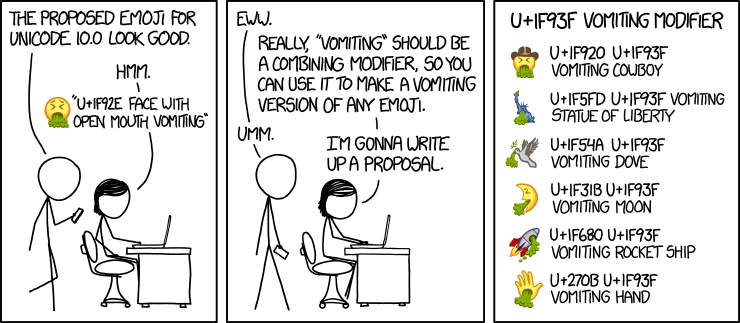
The vomiting modifier is fictional, but Unicode has real combining characters that attach to the character before them. A symbol you see as one letter can therefore be stored as two code points, which affects ordinary text as well as emoji. The \u escape uses exactly four hexadecimal digits, so '\u0301' is the combining acute accent, code point U+0301. Larger code points use \U followed by eight hexadecimal digits. Take the accented á: it can be one precomposed code point, or a plain a followed by that combining accent, and the two are not equal:
print(len('á'))           # precomposed: one code point
print(len('a\u0301'))      # 'a' plus a combining accent: two code points
print('á' == 'a\u0301')
These lines print:
1
2
False
Both strings render identically, but == compares code points, and the second string contains two. Two names that look the same can therefore fail an equality check. Normalization rewrites a string into a standard form. The NFC form uses precomposed code points where possible:
import unicodedata
print(unicodedata.normalize('NFC', 'a\u0301') == 'á')
These lines print:
TrueNormalize strings from different sources before comparing them, because Python will not do it for you.
Different characters that look alike also create security problems. The Latin a and the Cyrillic а are different code points that most fonts draw identically:
print('apple' == 'аpple') # the second word starts with a Cyrillic 'а'These lines print:
FalseAn attacker can register аpple.com with a Cyrillic а. It looks like apple.com but points to a different domain. This is called a homoglyph attack, and it is why your browser sometimes shows a foreign domain as an xn-- string instead of Unicode characters. A related problem occurs with the “smart quotes” produced by word processors. A character such as '\u2019' has a different code point from the straight ' Python expects, so pasting code from Google Docs can produce a hard-to-spot SyntaxError. Use a code editor such as VS Code to keep quotes unchanged.
Encodings
Our exporter must carry those code points from the input file into Python, then back into an HTML file. Unicode includes code points above one million, but a byte holds only 0 through 255. An encoding converts a sequence of code points into a sequence of bytes and back. Two string methods do the conversion, .encode for string to bytes and .decode for bytes to string:
print('hello world'.encode('utf-8'))These lines print:
b'hello world'The result, with its leading b, is a bytes object: raw numbers rather than text. Decoding performs the reverse step when we know the encoding used to produce those bytes:
encoded = 'café'.encode('utf-8')
print(encoded)
print(repr(encoded.decode('utf-8')))
These lines print:
b'caf\xc3\xa9'
'café'
For plain English it looks unchanged because UTF-8 uses one byte per ASCII character and reuses ASCII’s numbers. Existing ASCII text is therefore valid UTF-8. UTF stands for Unicode Transformation Format. The 8 refers to its 8-bit units, or bytes. UTF-8 is variable-length, so characters outside ASCII use more than one byte. Count the bytes three Chinese characters take under three Unicode encodings:
print(len('计算机'.encode('utf-8')))
print(len('计算机'.encode('utf-16')))
print(len('计算机'.encode('utf-32')))
These lines print:
9
8
16
For these three characters, UTF-8 uses 9 bytes. UTF-16 uses 6 plus a 2-byte byte-order mark, and UTF-32 uses 12 plus a 4-byte byte-order mark. The byte-order mark records how to interpret the byte sequence. All three can represent every Unicode character. ASCII cannot represent 计算机. UTF-8 became the web’s dominant encoding:
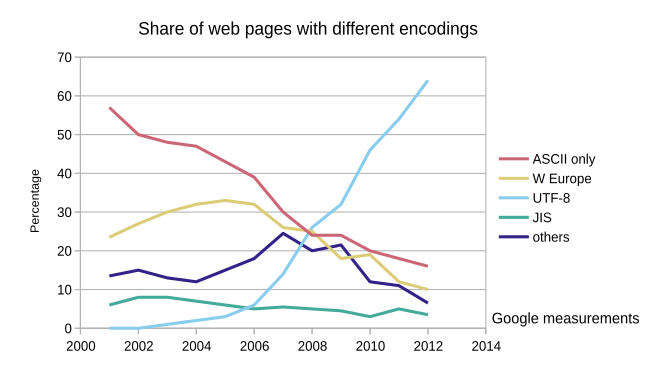
Use UTF-8 unless another encoding is specified. See Real Python’s guide to Unicode and encodings for more detail.
File Encodings
When you open a text file, Python decodes its bytes into a string. Return to publish_text.py and add encoding='utf-8' to the call that opens the poem:
with open('poem.txt', encoding='utf-8') as f:
    contents = f.read()
Decoding bytes with the wrong encoding can raise a UnicodeDecodeError. Add this final experiment to encoding_checks.py. These two bytes represent a valid character in China’s GB2312 encoding but not in Taiwan’s Big5:
print(repr(b'\xc8\xcb'.decode('gb2312')))
print(repr(b'\xc8\xcb'.decode('big5')))
The first decode prints a character. The second raises an exception whose final line is shown here:
'人'
UnicodeDecodeError: 'big5' codec can't decode byte 0xc8 in position 0: illegal multibyte sequence
b'\xc8\xcb' is a bytes object written with two \x escapes, the raw numbers 0xc8 and 0xcb, with no encoding attached. Under GB2312 they decode to 人 (“person”). Under Big5 they do not form a valid byte sequence. Arbitrary bytes do not reliably identify their encoding. Code that reads them must know or detect the encoding separately. UnicodeDecodeError usually means that the selected encoding does not match the file.
Complete Text Exporter
Use UTF-8 to read the poem and write the HTML, and declare that encoding in the page’s metadata. The completed script and sample poem are also available to open directly. Keep both files in the same folder. The completed publish_text.py has the same read, transform, and write steps, with UTF-8 specified for both files:
with open('poem.txt', encoding='utf-8') as f:
contents = f.read()
safe_text = contents.replace('&', '&')
safe_text = safe_text.replace('<', '<').replace('>', '>')
page = '<!DOCTYPE html><html><head><meta charset="utf-8">'
page = page + '<title>Poem</title></head>'
page = page + '<body><pre>' + safe_text + '</pre></body></html>'
with open('poem.html', 'w', encoding='utf-8') as f:
f.write(page)
print('wrote poem.html')The <meta charset="utf-8"> element tells the browser how to decode the HTML file, just as encoding='utf-8' tells Python how to decode the input. Run the exporter from its folder:
$ python3 publish_text.py
wrote poem.html
Try a line containing café & <tea> in poem.txt, save it, and rerun the program. The browser should show that exact text, including the accent, ampersand, and angle brackets. Reload the page after every export, just as you did while writing HTML by hand.
Practice and Assignments
The practice questions start with string operations, character-code arithmetic using the chart, encoding and decoding, and reading and writing files. Work through each snippet on paper, then open its Answer dropdown to check your work. The Markdown section starts with two short examples, followed by longer tracing challenges for the compiler project. Compare the related functions and track how each handles matched and unmatched markers.
In Download and Decode, restore a training dossier by decoding its text attachments and downloading a playable video.
Web pages also arrive as bytes that we decode, usually as UTF-8, before extracting data. The next reading uses try and except to make a game-score report survive missing files and invalid scores. The same approach can handle a decoding failure when a script processes many documents.