Lab: More Project Setup
Due: Wednesday, November 4 at 11:59pm (one week after it is assigned) · Worth: 8 points
A classmate wants to install your chatbot. Turn the reading’s chat.py into a tested chat command that remembers a conversation and exits cleanly. You will test it without calling a live model, then package it for local installation.
Start
Continue in the docchat repository from the reading, preserving its history for Project 3. If chat.py is missing, finish that reading first; do not clone another repository inside this one. Run the lab’s commands from docchat, with its Python environment activated:
$ python -m pip install -r requirements.txt
$ python -m pip install pytest coverage build setuptools
pytest runs doctests, coverage records the lines they execute, and build and setuptools package the program. Keep dependencies recorded in requirements.txt. Add these secrets and generated files to .gitignore, and keep them out of your commits:
.env
.venv/
venv/
.coverage
htmlcov/
__pycache__/
*.egg-info/
build/
dist/
A Testable Conversation
Move the reading’s interactive loop into a top-level function named repl(temperature=0.8). Keep the if __name__ == '__main__': guard and have it call repl(). Pass the temperature through to the model request so tests can set it to zero.
Write doctests that check a reply, a follow-up with retained history, and clean exits on both EOFError and KeyboardInterrupt. The repl docstring must include a test that actually calls repl(temperature=0). Use send_message(..., temperature=0) for direct conversation tests.
Scripted Input and Replies
An automated test cannot wait for keyboard input, and a live model can change its reply even at temperature zero. Monkey patching temporarily replaces a function so a test can control what it returns. Python’s unittest.mock.patch restores the original function when its with block ends.
Try a small experiment in scratch_patch.py before writing the conversation test:
from unittest.mock import patch

with patch('builtins.input', side_effect=['Hello', EOFError]):
    print(input('chat> '))
    try:
        input('chat> ')
    except EOFError:
        print('end of input')
Run the file:
$ python scratch_patch.py
Hello
end of input
The replacement supplies one message, then raises an exception to end input. Use this pattern in your repl doctest, with two messages before the exit. A replacement that always returns one string would leave the loop running forever.
The model also needs a fixed reply with the attributes your llm function reads. SimpleNamespace lets a test build those attributes; try appending this to the scratch file:
from types import SimpleNamespace

message = SimpleNamespace(content='Test reply')
reply = SimpleNamespace(choices=[SimpleNamespace(message=message)])
print(reply.choices[0].message.content)
Rerunning the file adds Test reply to its output. In your doctest, use patch.object(client.chat.completions, 'create', return_value=reply) alongside the input patch. That substitutes the provider’s reply while exercising your own request and history code. Check that the second request includes the first user message and assistant reply, and that each reply is printed. Add a separate case ending in KeyboardInterrupt.
Importing the reading’s chat.py constructs a client, so keep a nonempty key in your ignored .env even during offline tests. GROQ_API_KEY=offline-test works as a placeholder; use a real key only for live conversations. If you construct the client inside a function, patch that constructor instead of a global client.
Assigning input = ... inside a doctest changes that test’s local name, not the name used by repl. Patch builtins.input to affect the loop’s lookup, and use the context manager to restore it afterward. The scratch experiment is ungraded and needs no submission.
Untested Paths
Code coverage measures which lines execute during your tests; it does not establish that every result is correct. Run the doctests and inspect their coverage:
$ python -m coverage run -m pytest chat.py --doctest-modules
$ python -m coverage report -m --fail-under=91
$ python -m coverage html
If pytest reports collected 0 items, check your docstrings and >>> prompts. Open htmlcov/index.html and select chat.py to see missed lines. The screenshot shows an earlier version: green lines ran and red lines did not; your line numbers may differ.
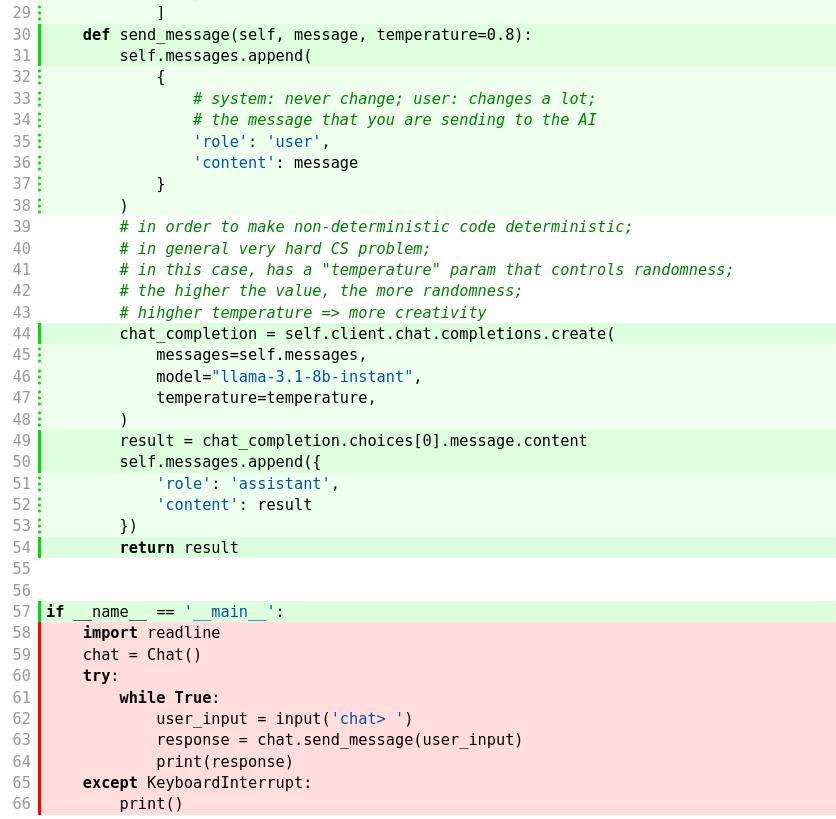
Add meaningful cases for missing paths, then rerun the commands. The main guard can remain uncovered because importing the module should not launch the loop. Aim for at least 91% locally; Gradescope requires coverage above 90% and also supplies its own conversation checks. Use the synchronous groq.Groq or openai.OpenAI client so those checks can substitute offline replies.
An Installed Chat Command
Create pyproject.toml in the repository root using the Python Packaging User Guide. TOML groups settings under bracketed section names. For this one-module package, include:
| Section | Settings |
|---|---|
[build-system] |
Require setuptools and use setuptools.build_meta as the build backend. |
[project] |
Choose a package name and version; set readme = "README.md"; declare groq (or openai) and python-dotenv as dependencies. |
[tool.setuptools] |
Set py-modules = ["chat"] to include chat.py. |
Define the installed command with this entry point:
[project.scripts]
chat = "chat:repl"
It tells the chat command to call repl() from chat.py. Write a short README.md describing the program, then build and install it:
$ python -m build
$ python -m pip install .
$ chat
Try a two-message conversation and confirm that the second reply uses the earlier context. Check both Ctrl+C and end-of-input: Ctrl+D in Bash/macOS/Linux, or Ctrl+Z then Enter in PowerShell. A live conversation needs a real API key; your doctests should work without contacting a provider.
If the command is missing, activate the environment where you installed the package and install again. Reinstall after source changes before testing the installed command. Gradescope independently installs the package and checks its input, replies, retained history, and exits with an offline model.
Optional Publication
Once local installation works, you may use the packaging guide to publish with twine on PyPI, where package names must be unique. Publication earns no additional points and needs no evidence file or submission.toml.
Submit
Commit and sync chat.py, pyproject.toml, README.md, declared dependencies, and .gitignore. Keep credentials, environments, caches, coverage output, and build artifacts out of the repository. Use Gradescope’s GitHub option to submit your repository and branch to lab-more-project-setup.
Grading Rubric
Gradescope checks each item separately and adds the points earned.
Total: 8 points.