Lab: Command-Line Tools and Exceptions
Due: Wednesday, October 7 at 11:59pm · Worth: 8 points
Recover the contents of a locked practice archive and report when the recovery succeeds. We will prepare a Cowsay command for the status display, check its formatting, and write a cracker that keeps trying after a failed password. The display and recovery code each earn 4 points independently; the supplied status report connects them as ungraded practice.
Start
Create lab-cli-tools from the starter template, clone your copy, and open it in VS Code. See course setup for VS Code and Git, and the first lab for the commit, sync, and submission workflow. A starter ZIP is also available: unzip it, open the inner lab-cli-tools folder, then use Initialize Repository and Publish to GitHub in VS Code. Work from this repository folder so Python can find the practice archives.
The Locked Archive
For this lab, pretend it is 2015 and you are an analyst at the GRU, the Russian military-intelligence agency. One of your agents has risked their life to bring you whitehouse_secrets.zip, stolen from a White House IT worker and said to hold details of the upcoming US presidential election. Your job is to open it, but the file is encrypted and you do not have the password. You do have leads.
In July 2015, the affair-oriented dating site Ashley Madison was breached and its entire user database leaked onto the internet.
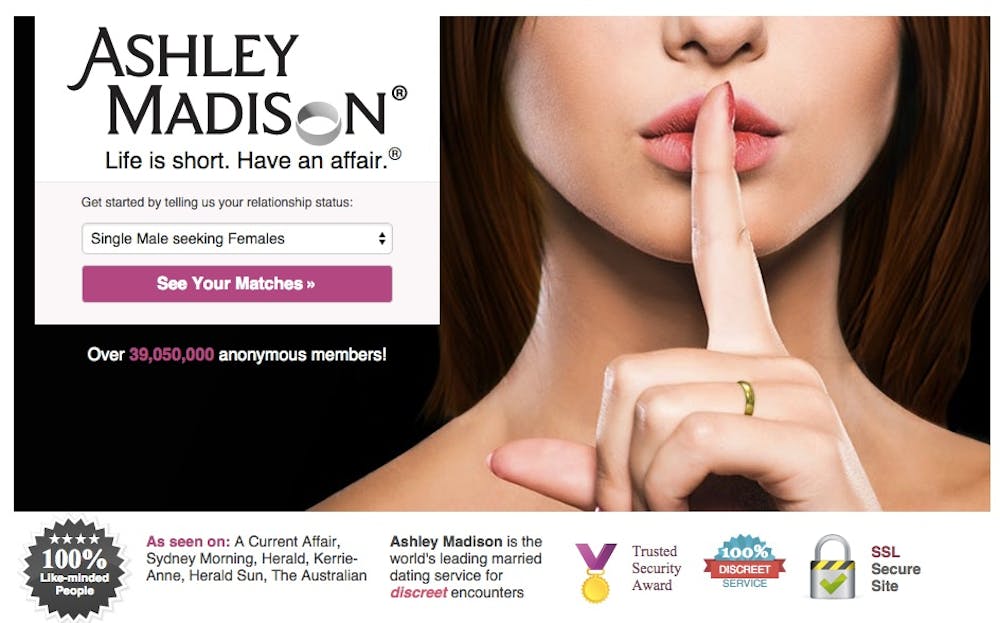
The badges on that homepage promise that the data is safe and encrypted. The leak became a prominent example of hacktivism. The White House IT worker who made the zip was an Ashley Madison user. Like most people, they reused a single password everywhere, so one of the leaked passwords will open the file.
The scenario draws on a Defense One report that 45 White House staffers and more than 10,000 military personnel had Ashley Madison accounts. The Associated Press confirmed a White House IT staffer among them.
We will first make the recovery tool report its status, then use the known-password archive to practice the extraction step.
Install the Recovery Display
Run the supplied script with a message of your choice:
$ python3 cowsay/__main__.py 'mooooo moooo'We will install it so we can run cowsay by name when reporting the recovery status. Python’s package installer, pip, reads pyproject.toml to learn which package and command to install.

In lab-cli-tools, set up a Python environment. Install the project with the environment’s Python:
$ python -m pip install .While this environment is active, the cowsay command works from any folder:
$ cowsay 'moo'
 _____
| moo |
 -----
        \   ^__^
         \  (oo)\_______
            (__)\       )\/\
                ||----w |
                ||     ||
Change the message and check that the speech bubble changes. Then try the installed command from a different folder. What does installation let you do that running cowsay/__main__.py did not? Return to lab-cli-tools before continuing. If the command is missing, activate the environment in which you installed it.
python -m pip install . installs this folder’s project; a package name such as yt-dlp installs a published package. You tried the downloader in the previous lab, so there is no need to install it again here. The name pip means “Pip Installs Packages,” a recursive acronym, like GNU (“GNU’s Not Unix”).
A Readable Status Tool
PEP 8 describes Python’s formatting conventions. For example, x = 1 + 2 has spaces around its operators; x=1+2 computes the same result but ignores that convention. A linter checks code for problems such as these. Install flake8 and run it on the supplied package:
$ python -m pip install flake8
$ flake8 --isolated cowsay
Each diagnostic gives a file, line, column, and rule:
cowsay/__main__.py:8:19: E201 whitespace after '('Find that location in cowsay/__main__.py and fix the reported whitespace. Continue until flake8 --isolated cowsay prints nothing. Reinstall with python -m pip install ., then run cowsay "moo" again to check that the formatting edits preserved its behavior.
Run python recovery_status.py to check the supplied report. Before extraction it reports that no output is saved; once the result file exists it tells you where to inspect it. File existence alone does not prove that the password was correct, so always open the result and check its contents. The report is ungraded and does not change what your cracker must print.
Practice with a Known Password
Python opens password-protected zip files with the built-in zipfile module. Create open_archive.py with this code, then run python open_archive.py:
from zipfile import ZipFile
with ZipFile('guido_secrets.zip') as zf:
    password = b'BFDL'
    zf.extractall(pwd=password)
After the code runs, a new file appears at the relative path guido_secrets/secrets.txt, inside the guido_secrets folder. The file holds a poem, The Zen of Python. Open it in VS Code.
pwd requires a bytes object. Compare b'BFDL' with 'BFDL' and predict which one the method accepts before trying both. A string’s .encode('ascii') method produces bytes.
Try an incorrect password and read the exception. Depending on your system, extraction can raise RuntimeError, BadZipFile, or zlib.error. A failed attempt may leave an output file, so check its contents before treating extraction as successful.
Zip Bombs
Some zip files are zip bombs, which expand to consume excessive storage when decompressed. Antivirus software routinely opens zip files to scan inside them, and opening the wrong one can take a machine down: decompressing it can fill the entire hard drive.
Zip bombs can contain huge amounts of repeated data or recursively nested archives. They are not included in this starter. Work only with the two small practice archives, guido_secrets.zip and whitehouse_secrets.zip.
Try the Candidate Passwords
Open Ashley-Madison.txt in SecLists, choose Download raw file, and save it as
Ashley-Madison.txtbesidewhitehouse_secrets.zipinlab-cli-tools. Open it in VS Code: it should contain one candidate password per line. If it begins with HTML tags, you saved the GitHub webpage; download the raw file instead.Write a program
password_cracker.pythat finds the zip file’s password. It should:Hint. Use a
try/exceptaround extraction: try each password, catchRuntimeError,zipfile.BadZipFile, andzlib.error, and continue to the next password. Import the exception classes or their modules before using them. Stop the loop after successful extraction so later guesses do not overwrite the recovered file. A zip password must bebytes, so call.encode()on each one. A line read from a file includes its trailing newline, so call.strip()before trying it.To see that a long run is progressing, you can print its count every 10,000 attempts.
For your own accounts, use a different password for each site. XKCD 936 illustrates password strength; this advice is optional and ungraded.
The Recovered Report
After the cracker succeeds, run python recovery_status.py again. The Cowsay display should report where the saved file is located. Open whitehouse_secrets/whitehouse_secrets.txt in VS Code and verify that its contents are readable secrets rather than the garbage a failed guess can leave behind. If the display command is unavailable, the supplied report prints the same message as plain text; recovery credit does not depend on decoration.
Submit
Commit and sync cowsay/, pyproject.toml, password_cracker.py, and whitehouse_secrets/whitehouse_secrets.txt in your lab-cli-tools repository. Keep the starter’s packages = ["cowsay"] setting in pyproject.toml; the extracted folders are data. Run the cracker from lab-cli-tools, where both input files live. On Gradescope, choose GitHub and submit that repository and the branch containing your work to lab-cli-tools. You may resubmit as you finish more steps.
Grading Rubric
Gradescope checks each item separately and adds the points earned.
Total: 8 points.